Testing From the Outside: pytest
ztest gave you a real superpower: anything you can call from C, you can assert on. But plenty of firmware behaviour only exists outside the binary — what a shell command prints, what crosses the serial line, whether an OTA update takes, whether the device answers a ping. No zassert can reach those. You have to stand where the user stands and poke the device from the outside.
That's the pytest harness: you write the test in Python, on your PC, and it drives the running firmware. Same Twister, same native_sim — ztest and pytest are just two harnesses Twister can pick from to decide pass/fail. The only change is who renders the verdict: a Python assert, not a C one.
The complete, runnable project is already in your workspace at zephyr/samples/efz_samples/05_ztest/pytest_calc (view on GitHub).
ZTest or pytest? 🤔
| ztest | pytest harness | |
|---|---|---|
| Test written in | C (zassert_*) | Python (assert) |
| Runs | inside the firmware | on the host, talking to the firmware |
| Sees | functions, variables, internal state | only what the device exposes (shell, serial, network) |
| Best for | unit-testing logic & functions | interaction / system tests |
| Pass/fail decided by | ztest console (PASS/FAIL) | pytest assertions |
👉 Rule of thumb: testing a function → ZTest. Testing a behaviour → pytest.
How the pytest harness works
The build-and-run machine is exactly the same as ztest — only the last mile changes. Instead of grepping the ztest console, Twister hands the running device to pytest:
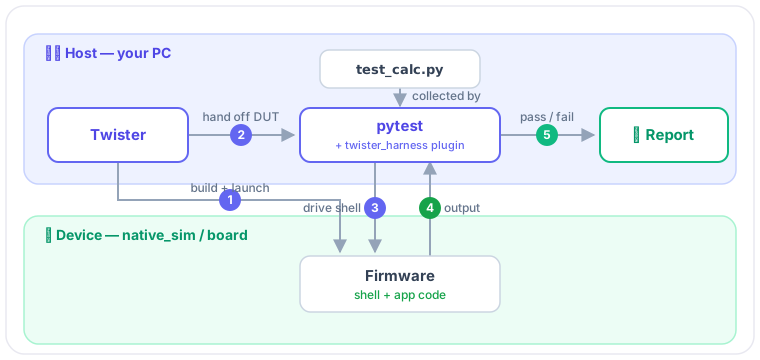
The glue is the twister_harness pytest plugin (ships with Zephyr). It gives your test functions ready-to-use fixtures:
| Fixture | What it gives you |
|---|---|
dut | the raw device (DeviceAdapter) — read/write its serial stream |
shell | a Shell helper — send a command, get the output lines back |
mcumgr | MCUmgr client — for OTA / DFU flows |
For most tests shell is all you need.
The example: test add() through the shell
We'll test the same add() as ztest_calc, but from the outside. The firmware exposes add as a shell command; the Python test types add 2 3 and checks the result.
pytest_calc/
├── include/calc.h          # same add() as ztest_calc
├── src/calc.c
└── tests/
    ├── CMakeLists.txt       ← builds main.c + calc.c
    ├── prj.conf             ← shell on + UART to stdin/stdout
    ├── testcase.yaml        ← harness: pytest
    ├── main.c              ← registers the `add` shell command
    └── pytest/
        └── test_calc.py    ← the test (Python)
1 · Expose the function as a shell command — tests/main.c
#include <stdlib.h>
#include <zephyr/kernel.h>
#include <zephyr/shell/shell.h>
#include "calc.h"

static int cmd_add(const struct shell *sh, size_t argc, char **argv)
{
    int a = atoi(argv[1]);
    int b = atoi(argv[2]);

    shell_print(sh, "%d", add(a, b));   /* prints the answer for the test to read */
    return 0;
}

/* mandatory args = 3 (command + two operands), optional = 0 */
SHELL_CMD_ARG_REGISTER(add, NULL, "Add two integers: add <a> <b>", cmd_add, 3, 0);

int main(void) { return 0; }
2 · Turn on the shell — tests/prj.conf
CONFIG_SHELL=y

# native_sim's UART is a PTY by default, so its output never reaches the
# host stdout the harness reads. Bind UART 0 to stdin/stdout instead:
CONFIG_UART_NATIVE_PTY_0_ON_STDINOUT=y
On native_sim the shell talks over a virtual UART that, by default, is a pseudo-terminal — not the process's stdout. The pytest harness waits for the uart:~$ prompt on stdout, never sees it, and fails every test with Prompt not found. CONFIG_UART_NATIVE_PTY_0_ON_STDINOUT=y wires the UART to stdin/stdout so the harness can actually talk to it.
3 · Select the harness — tests/testcase.yaml
tests:
  calc.testing.pytest:
    platform_allow: [native_sim]
    integration_platforms: [native_sim]
    harness: pytest
    harness_config:
      pytest_root:
        - "pytest/test_calc.py"   # path is relative to this yaml; defaults to "pytest/"
    tags: test_framework
harness: pytest is the whole switch. pytest_root tells Twister where the Python tests live.
4 · Write the test — tests/pytest/test_calc.py
from twister_harness import Shell


def test_add_positives(shell: Shell):
    output = "\n".join(shell.exec_command("add 2 3"))
    assert "5" in output, f"2 + 3 should be 5, got: {output!r}"


def test_add_negatives(shell: Shell):
    output = "\n".join(shell.exec_command("add -3 -4"))
    assert "-7" in output, f"-3 + -4 should be -7, got: {output!r}"
shell.exec_command(...) sends the line to the device and returns its output as a list of strings. Everything else is plain pytest — assert, fixtures, parametrize, whatever you already know.
Run it 🏃
The same Twister command as before — native_sim is the platform, and you need pytest installed in your Python environment:
west twister -p native_sim -v -n -T tests/
INFO - 1/1 native_sim/native    calc.testing.pytest    PASSED (native 0.42s)
INFO - 2 of 2 executed test cases passed (100.00%) ...
Where's the pytest report? 📄
A common surprise: twister-out/twister.xml is Twister's own roll-up summary — it doesn't look like a pytest report because it isn't one. Twister wraps pytest, so pytest's own artifacts sit deeper, in the scenario's build folder:
| File | Written by | What it is |
|---|---|---|
twister-out/twister.xml | Twister | summary across all scenarios |
…/calc.testing.pytest/report.xml | pytest | the junit-xml report |
…/calc.testing.pytest/twister_harness.log | pytest | the familiar test session starts … N passed console |
Don't hand-type that long path — just find them:
find twister-out -name twister_harness.log   # pytest console log
find twister-out -name report.xml            # pytest junit report
What a failure looks like
Change an expected value and re-run — pytest reports the failing assertion with the line and the captured shell output:
def test_add_positives(shell: Shell):
    output = "\n".join(shell.exec_command("add 2 3"))
    assert "6" in output, f"2 + 3 should be 5, got: {output!r}"   # 6? it's 5 — this fails
INFO - 1/1 native_sim/native calc.testing.pytest FAILED
FAILED test_calc.py::test_add_positives - AssertionError: 2 + 3 should be 5, got: '5'
Recap
- Function → ZTest. Behaviour (shell / serial / OTA / network) → pytest.
- Three switches:
CONFIG_SHELL=y(+UART_NATIVE_PTY_0_ON_STDINOUTon native_sim),harness: pytestintestcase.yaml, and apytest/test_*.pyusing theshellfixture. - Run with the same
west twister -p native_sim -T tests/. - The pytest report isn't
twister.xml—find twister-out -name twister_harness.log. Prompt not found? You forgot to bind the native_sim UART to stdin/stdout.
Source: Zephyr pytest harness docs